Passing in a Weakly Typed Property to a Pipeline

on Thursday, September 17, 2009

Simply adding a property to the model's property bag is not enough if you wish to pass on some information down to the pipelines. Without having to create a full fledged strongly typed property, here is how you can pass in a weakly typed property to a pipeline. For this example, we will try and pass a OrderNumberPrefix property to the pipeline.

Changes to MetadataDefinitions.xml

  1. Open the MetadataDefinitions.xml and look for the following tag:
    <CommerceEntity name="Basket">
  2. Within this tag, locate the <PropertyMappings> tag.
  3. Add a new property inside this tag as follows:
    <PropertyMapping property="OrderNumberPrefix" csProperty="OrderNumberPrefix"/>
  4. Scroll further down within the same CommerceEntity tag for the basket, until you find the <Properties> tags. You will see all the properties listed here. Add the following tag within this tag:
    <Property name="OrderNumberPrefix" dataType="String">
    <DisplayName value="OrderNumberPrefix"/>
    </Property>

Changes to Order.cs & PipelineConstants.cs

  1. Add the following public property to the PipelineConstants.cspublic const string OrderNumberPrefixField = "OrderNumberPrefix";
  2. Open the Order.cs business entity class, and add a new public property called OrderNumberPrefix (just like the existing OrderNumber property). It will look something like this:
    public string OrderNumberPrefix
    {
    get { return GetValue(PipelineConstants.OrderNumberPrefixField); }
    set { this[PipelineConstants.OrderNumberPrefixField] = value; }
    }

This just makes it easier for you to access the property in the pipeline.

Passing in the weakly typed property to the pipeline

The last method that gets called when submitting an order is "AddBasketOrderSubmitRequest" inside the ShoppingController.cs. Add the following line inside this method:

update.Model.Properties["OrderNumberPrefix"] = SiteContext.Current.OrderNumberPrefix;

assuming your OrderNumberPrefix is coming from the site context. In theory, you could be retreiving it from wherever you like.

Retreiving the weakly typed property in the pipeline

Within the execute method of your pipeline processor, after you populate the order object using the pdispOrder dictionary, you can simple access the new property as follows:

var order = new Order((IDictionary)pdispOrder);
order.OrderNumberPrefix

Profile MetaDataException

on Friday, July 17, 2009

If you get an error of the following type:


An exception of type 'Microsoft.Commerce.Providers.Metadata.MetadataException'
occurred and was
caught.
---------------------------------------------------------------------------
07/17/2009
10:46:57
Type : Microsoft.Commerce.Providers.Metadata.MetadataException,
Microsoft.Commerce.Providers, Version=1.0.0.0, Culture=neutral,
PublicKeyToken=31bf3856ad364e35
Message : Commerce Server class
'Microsoft.CommerceServer.Runtime.Profiles.Profile' or its definition 'Something'
is not found in the Commerce Server metadata.
Source :
Microsoft.Commerce.Providers
Help link :
Data :
System.Collections.ListDictionaryInternal
TargetSite :
Microsoft.Commerce.Providers.Metadata.CommerceServerEntity
GetCommerceServerEntity(System.String, System.String)
Stack Trace : at
Microsoft.Commerce.Providers.Metadata.MergedMetadata.GetCommerceServerEntity(String
commerceClassName, String commerceDefinitionName)
at
Microsoft.Commerce.Providers.Metadata.MergedMetadata.CreateMergedMetadata(CommerceEntityDelta
repositoryСommerceEntityDelta, EntityMappingDelta repositoryEntityMapping)
at
Microsoft.Commerce.Providers.Metadata.MergedMetadata.MergeMetadata(InheritableCollection`1
repositoryMetadata, MetadataCollection`1 commerceServerMetadata)
at
Microsoft.Commerce.Providers.Metadata.MergedMetadataLoader.GetMergedMetadata(String
siteChannelKey, OperationCacheDictionary operationCache)
at
Microsoft.Commerce.Providers.Metadata.MergedMetadataLoader.ExecuteQuery(CommerceQueryOperation
queryOperation, OperationCacheDictionary operationCache,
CommerceQueryOperationResponse response)
at
Microsoft.Commerce.Providers.Components.OperationSequenceComponent.Execute(CommerceOperation
operation, OperationCacheDictionary operationCache, CommerceOperationResponse
response)
at
Microsoft.Commerce.Broker.OperationSequence.ExecuteComponentTree(List`1
executionTreeList, CommerceOperation operation, OperationCacheDictionary
operationCache, CommerceOperationResponse response)
at
Microsoft.Commerce.Broker.OperationSequence.Execute(CommerceOperation
operation)
at Microsoft.Commerce.Broker.MessageHandler.ProcessMessage(String
messageHandlerName, CommerceOperation operation)
at
Microsoft.Commerce.Broker.OperationService.InternalProcessRequest(CommerceRequest
request)
at
Microsoft.Commerce.Providers.Utility.CommerceEntityMetadata.ExecuteMetadataQuery(MetadataCacheKey
cacheKey, String modelName)
at
Microsoft.Commerce.Application.Common.CachedFactory`2.GetOrCreate(TKey key,
CreateInstance`2 factory)
at
Microsoft.Commerce.Providers.Utility.CommerceEntityMetadata.Get(String
modelName, Nullable`1 commerceArea)
at
Microsoft.Commerce.Providers.Utility.ProfileMetadata.<>c__DisplayClass5.b__4(MetadataCacheKey
key)
at
Microsoft.Commerce.Application.Common.CachedFactory`2.GetOrCreate(TKey key,
CreateInstance`2 factory)
at
Microsoft.Commerce.Providers.Utility.ProfileMetadata.Get(String modelName)
at
Microsoft.Commerce.Providers.Components.ProfileOperationSequenceComponent.get_Metadata()
at
Microsoft.Commerce.Providers.Components.ProfileOperationSequenceComponent.AreSearchParametersValid(CommercePropertyCollection
properties)
at
Microsoft.Commerce.Providers.Components.ProfileOperationSequenceComponent.ValidateSearchCriteria(CommerceModelSearch
searchCriteria)
at
Microsoft.Commerce.Providers.Components.ProfileOperationSequenceComponent.GetMatches(CommerceModelSearch
searchCriteria, Nullable`1& totalItemCount, Boolean throwIfNotFound)
at
Microsoft.Commerce.Providers.Components.ProfileLoaderBase.ExecuteQuery(CommerceQueryOperation
queryOperation, OperationCacheDictionary operationCache,
CommerceQueryOperationResponse response)
at
Microsoft.Commerce.Providers.Components.OperationSequenceComponent.Execute(CommerceOperation
operation, OperationCacheDictionary operationCache, CommerceOperationResponse
response)
at
Microsoft.Commerce.Providers.Components.ProfileOperationSequenceComponent.Execute(CommerceOperation
operation, OperationCacheDictionary operationCache, CommerceOperationResponse
response)
at
Microsoft.Commerce.Broker.OperationSequence.ExecuteComponentTree(List`1
executionTreeList, CommerceOperation operation, OperationCacheDictionary
operationCache, CommerceOperationResponse response)
at
Microsoft.Commerce.Broker.OperationSequence.Execute(CommerceOperation
operation)
at Microsoft.Commerce.Broker.MessageHandler.ProcessMessage(String
messageHandlerName, CommerceOperation operation)
at
Microsoft.Commerce.Broker.OperationService.InternalProcessRequest(CommerceRequest
request)
at
Microsoft.Commerce.Broker.OperationService.ProcessRequest(CommerceRequest
request)
A couple of things you may want to check are:

1. Make sure the entity definition inside MetaDataDefinitions.xml is correct.
3. Verify the entries into the Channel Config.
2. If you have extended the Profile entity make sure that the changes you have made to the Profile Schema don't have any name mismatches. So open up Commerce Server Manager and make sure that the Profile Definition and the Data Object is named appropriately.

Adding a new Payment Method in Commerce Server 2009 Mojave

on Tuesday, April 21, 2009

This is a very obvious thing that one would want to do and a rather tricky thing mostly due to the lack of documentation. There are some samples that ship with CS09 and they work in an ASP.NET demo application, but how do you add a new payment method inside the starter site that ships with CS09. This article explains exactly the steps you need to take to introduce a new payment method, for instance, a cheque payment method. This articles assumes you are working with the Mojave starter site code.

1. Create ChequePayment class on the Commerce Server side. In my case we created this class inside an OrderComponents project.

using System;
using System.Collections.Generic;
using System.Linq;
using System.Runtime.InteropServices;
using System.Text;
using Microsoft.CommerceServer.Runtime.Orders;
using Microsoft.CommerceServer.Orders;
using System.Security.Permissions;
using System.Runtime.Serialization;


namespace XYZ.CommerceServer.Order.Components.BusinessEntities
{
///


///
///

[Serializable]
[ComVisible(false)]
public class ChequePayment : Payment
{
private string chequeNumber = null;

public new PaymentMethodTypes PaymentType
{
get
{
return PaymentMethodTypes.Custom1;
}

}

public ChequePayment()
: base()
{
}

public ChequePayment(string billingAddressId,Guid paymentMethodId)
{
base.BillingAddressId = billingAddressId;
base.PaymentMethodId = paymentMethodId;
}


///
/// Deserialization constructor for ISerializable support.
///

protected ChequePayment(SerializationInfo info, StreamingContext context)
: base(info, context)
{
this.chequeNumber = (string)info.GetValue("ChequeNumber", typeof(string));
}

///
/// Serializes this object to the provided serialization context.
///

[SecurityPermissionAttribute(SecurityAction.Demand, SerializationFormatter = true)]
public override void GetObjectData(SerializationInfo info, StreamingContext context)
{
base.GetObjectData(info, context);
info.AddValue("ChequeNumber", this.chequeNumber);
}

///
/// The cheque number.
///

public string ChequeNumber
{
get
{
return this.chequeNumber;
}
set
{
this.SetDirty(value);
this.chequeNumber = value;
}
}
}
}

2. Create ChequePaymentTranslator class.

//-----------------------------------------------------------------------
//
// Copyright © Microsoft Corporation. All rights reserved.
//

// Csr refund sequence component
//-----------------------------------------------------------------------

namespace XYZ.CommerceServer.Order.Components.BusinessEntities
{
using System;
using System.Collections.Generic;
using System.Linq;
using System.Text;
using Microsoft.Commerce.Providers.Translators;
using Microsoft.Commerce.Contracts;
using Microsoft.CommerceServer.Runtime.Orders;
using Microsoft.Commerce.Common;
using CSO = Microsoft.CommerceServer.Runtime.Orders;

public class ChequePaymentAccountTranslator :
IToCommerceEntityTranslator,
IToExternalEntityTranslator
{
private PropertyTranslator chequePropertyTranslator;

private PropertyTranslator ChequePropertyTranslator
{
get
{
return this.chequePropertyTranslator;
}
set
{
this.chequePropertyTranslator = value;
}
}

public ChequePaymentAccountTranslator()
{
// this.ChequePropertyTranslator = new PropertyTranslator
this.ChequePropertyTranslator = new PropertyTranslator(
new FromCommerceServerPropertyTranslator(this.TranslateFromStronglyTypedCommerceServerProperty),
new FromCommerceServerPropertyTranslator(this.TranslateFromWeaklyTypedCommerceServerProperty),
new ToCommerceServerPropertyTranslator(this.TranslateToStronglyTypedCommerceServerProperty),
new ToCommerceServerPropertyTranslator(this.TranslateToWeaklyTypedCommerceServerProperty));

}

public void Translate(CommerceEntity sourceCommerceEntity, object destinationObject)
{
if (sourceCommerceEntity.ModelName.Equals("Cheque"))
{
ChequePayment commerceServerObject = destinationObject as ChequePayment;
if (commerceServerObject == null)
{
ThrowCannotTranslate(sourceCommerceEntity, destinationObject);
}
this.ChequePropertyTranslator.TranslateToCommerceServer(sourceCommerceEntity, commerceServerObject, null);
}
}

public void Translate(object sourceObject, CommerceEntity destination, CommercePropertyCollection propertiesToReturn)
{
ChequePayment commerceServerObject = sourceObject as ChequePayment;
if (commerceServerObject != null)
{
if (!destination.ModelName.Equals("Cheque"))
{
ThrowCannotTranslate(sourceObject, destination);
}
this.ChequePropertyTranslator.TranslateToCommerceEntity(commerceServerObject, destination, propertiesToReturn);
}
}

private static void ThrowCannotTranslate(object source, object destination)
{
string reason = Microsoft.Commerce.Providers.ProviderResources.ExceptionMessages.GetMessage("TranslationFailed", new object[] { source.GetType().FullName, destination.GetType().FullName });
throw new System.ServiceModel.FaultException(new Microsoft.Commerce.Contracts.Faults.GeneralOperationFault(reason), reason);
}

protected bool TranslateToWeaklyTypedCommerceServerProperty(
CSO.Payment commerceServerObject,
string commerceServerPropertyName,
object value)
{
commerceServerObject[commerceServerPropertyName] = value;
return true;
}

protected bool TranslateFromWeaklyTypedCommerceServerProperty(
CSO.Payment commerceServerObject,
string commerceServerPropertyName,
CommerceEntity commerceEntity,
string mojavePropertyName)
{
commerceEntity.Properties[mojavePropertyName] = commerceServerObject[commerceServerPropertyName];
return true;
}

protected virtual bool TranslateToStronglyTypedCommerceServerPropertyBase(
CSO.Payment commerceServerObject,
string commerceServerPropertyName,
object value)
{
switch (commerceServerPropertyName)
{
case "BillingAddressId":
commerceServerObject.BillingAddressId = value as string;
break;

case "CustomerNameOnPayment":
commerceServerObject.CustomerNameOnPayment = value as string;
break;

default:
return false; // the property was NOT translated
}

return true; // the property was translated
}

protected virtual bool TranslateFromStronglyTypedCommerceServerPropertyBase(
CSO.Payment commerceServerObject,
string commerceServerPropertyName,
CommerceEntity commerceEntity,
string mojavePropertyName)
{
switch (commerceServerPropertyName)
{
case "PaymentId":
commerceEntity.Properties[mojavePropertyName] = commerceServerObject.PaymentId.ToString("B");
break;

case "BillingAddressId":
commerceEntity.Properties[mojavePropertyName] = commerceServerObject.BillingAddressId;
break;

case "CustomerNameOnPayment":
commerceEntity.Properties[mojavePropertyName] = commerceServerObject.CustomerNameOnPayment;
break;

default:
return false; // the property was NOT translated
}

return true; // the property was translated
}

protected bool TranslateFromStronglyTypedCommerceServerProperty(
ChequePayment commerceServerObject,
string commerceServerPropertyName,
CommerceEntity commerceEntity,
string mojavePropertyName)
{
if (this.TranslateFromStronglyTypedCommerceServerPropertyBase(commerceServerObject, commerceServerPropertyName, commerceEntity, mojavePropertyName))
{
return true;
}
string str = commerceServerPropertyName;
if (str != null)
{
if (str == "ChequeNumber")
{
commerceEntity.Properties[mojavePropertyName] = commerceServerObject.ChequeNumber;
goto Label_005C;
}
}
return false;
Label_005C:
return true;
}

protected bool TranslateToStronglyTypedCommerceServerProperty(
ChequePayment commerceServerObject,
string commerceServerPropertyName,
object value)
{
if (this.TranslateToStronglyTypedCommerceServerPropertyBase(commerceServerObject, commerceServerPropertyName, value))
{
return true;
}
string str = commerceServerPropertyName;
if (str != null)
{
if (str == "ChequeNumber")
{
commerceServerObject.ChequeNumber = value.ToString();
goto Label_004C;
}
}
return false;
Label_004C:
return true;
}
}
}

3. Create the PaymentResponseBuilder.cs

namespace XYZ.CommerceServer.Order.Components.BusinessEntities
{
using System;
using System.Collections.Generic;
using System.Diagnostics;
using System.Linq;
using System.Text;
using CSO = Microsoft.CommerceServer.Runtime.Orders;
using Microsoft.Commerce.Common;
using Microsoft.Commerce.Contracts.CommerceEntities;
using Microsoft.Commerce.Providers.Translators;
using Microsoft.Commerce.Contracts.Messages;
using Microsoft.Commerce.Contracts;
using System.Runtime.InteropServices;
using Microsoft.Commerce.Common.MessageBuilders;
using Microsoft.Commerce.Providers.Utility;
using Microsoft.Commerce.Providers.CSHelpers;
using Microsoft.Commerce.Broker;
using Microsoft.Commerce.Providers.Components;

///
/// This class is responsible for populating the response of the create and update Basket
/// operations with the information relevant to the Payments.
///

[ComVisible(false)]
public class XYZPaymentsResponseBuilder : BasketRelatedItemOperationSequenceComponent
{
#region BasketRelatedItemOperationSequenceComponent Overrides

///
/// Gets the RelationshipName
///

protected override string RelationshipName
{
get { return "Payments"; }
}

///
/// Populates the Basket.Payments collection for the query operation.
///

/// contains the realted item to query
protected override void QueryRelatedItem(CommerceQueryRelatedItem queryRelatedItemOperation)
{
Debug.Assert(queryRelatedItemOperation != null, "queryRelatedItemOperation cannot be null");
Debug.Assert(this.OperationCache != null, "OperationCache must be initialized by the base class.");

CommerceEntity modelPayment = queryRelatedItemOperation.GetModel("Payment");

foreach (CommerceEntity responseBasket in this.GetResponseCommerceEntities("Basket"))
{
CommerceRelationshipList paymentList = responseBasket.Properties["Payments"] as CommerceRelationshipList;
if (paymentList == null)
{
paymentList = new CommerceRelationshipList();
responseBasket.Properties["Payments"] = paymentList;
}

CSO.OrderForm orderForm = this.OperationCache.GetCachedCommerceServerOrderGroup(
responseBasket.Id).GetDefaultOrderForm();

foreach (CSO.Payment commerceServerPayment in orderForm.Payments)
{
CommerceEntity responsePayment = new CommerceEntity("Payment");
paymentList.Add(new CommerceRelationship(responsePayment));

Translator.ToCommerceEntity(commerceServerPayment, responsePayment, modelPayment.Properties);

QueryPaymentAccount(queryRelatedItemOperation, responsePayment, commerceServerPayment);
}
}
}

#endregion

private static void QueryPaymentAccount(
CommerceQueryRelatedItem paymentQuery,
CommerceEntity responsePayment,
CSO.Payment commerceServerPayment)
{
Debug.Assert(paymentQuery != null, "paymentQuery should not be null");
Debug.Assert(responsePayment != null, "responsePayment should not be null");
Debug.Assert(commerceServerPayment != null, "commerceServerPayment should not be null");

CommerceQueryRelatedItem paymentAccountQuery = (paymentQuery.
GetRelatedOperations("PaymentAccount")).FirstOrDefault();

if (paymentAccountQuery == null)
{
return; // PaymentAccount is not requested
}

CommerceEntity paymentAccount = null;

switch (commerceServerPayment.PaymentType)
{
case Microsoft.CommerceServer.Orders.PaymentMethodTypes.CashCard:
paymentAccount = new CommerceEntity("CashCard");
break;
case Microsoft.CommerceServer.Orders.PaymentMethodTypes.CreditCard:
paymentAccount = new CommerceEntity("CreditCard");
break;
case Microsoft.CommerceServer.Orders.PaymentMethodTypes.GiftCertificate:
paymentAccount = new CommerceEntity("GiftCertificate");
break;
case Microsoft.CommerceServer.Orders.PaymentMethodTypes.PurchaseOrder:
paymentAccount = new CommerceEntity("PurchaseOrder");
break;
default:
switch (commerceServerPayment.DerivedClassName)
{
case "ChequePayment":
paymentAccount = new CommerceEntity("Cheque");
break;
case "FreePayment":
paymentAccount = new CommerceEntity("Free");
break;
}
break;
}

if (paymentAccount != null)
{
responsePayment.Properties["PaymentAccount"] = new CommerceRelationship(paymentAccount);

CommerceEntity paymentAccountModel = paymentAccountQuery.Model;
Translator.ToCommerceEntity(commerceServerPayment, paymentAccount, paymentAccountModel.Properties);

QueryPaymentMethod(paymentAccountQuery, paymentAccount, commerceServerPayment);
}
}

private static void QueryPaymentMethod(
CommerceQueryRelatedItem paymentAccountQuery,
CommerceEntity paymentAccount,
CSO.Payment commerceServerPayment)
{
Debug.Assert(paymentAccountQuery != null, "paymentAccountQuery should not be null");
Debug.Assert(paymentAccount != null, "paymentAccount should not be null");
Debug.Assert(commerceServerPayment != null, "commerceServerPayment should not be null");

CommerceQueryRelatedItem paymentMethodQuery = (paymentAccountQuery.
GetRelatedOperations("PaymentMethod")).FirstOrDefault();

if (paymentMethodQuery == null)
{
return; // PaymentMethod is not requested
}

CommerceEntity paymentMethodModel = paymentMethodQuery.GetModel("PaymentMethod");
CommerceEntity paymentMethod = PaymentHelper.GetPaymentMethodByMethodId(
OperationContext.CurrentInstance.SiteName,
OperationContext.CurrentInstance.RequestContext.UserLocale,
commerceServerPayment.PaymentMethodId.ToString(),
paymentMethodModel.Properties);

paymentAccount.Properties["PaymentMethod"] = new CommerceRelationship(paymentMethod);
}
}
}

4. Modify the WSPBuild\CommerceServer\OrderPipelineMappings.xml by adding


5. Modify the WSPBuild\CommerceServer\OrderObjectMappings.xml by adding


...


...


6. Modify the WSPBuild\CommerceServer\MetadataDefinitions.xml by adding


csType="Cactus.CommerceServer.Order.Components.BusinessEntities.ChequePayment"
csAssembly="Cactus.CommerceServer.Order.Components, Version=1.0.0.0, Culture=neutral, PublicKeyToken=911380ffc789d881"
csArea="Orders">


7. Modify the WSPBuild\CommerceServer\ChannelConfiguration.config by adding the following in the ToCommerceEntities tags:


8. Modify the WSPBuild\CommerceServer\ChannelConfiguration.config by adding the following in the ToExternalEntities tags:


9. Modify the SharePointCommon\FeatureActivation\DefaultConfigs\CommerceServer.xml by adding:

name="chequeprocessor"
path="pipelines\Cheque.pcf"
transacted="false"
type="OrderPipeline"
loggingEnabled="false"/>

...


...

...


10. Modify the UI\Orders\WebControls\XsltControls\XsltBasketControl.cs RenderPayments method as follows:

///
/// Renders the payments.
///

/// The XML writer.
protected void RenderPayments(XmlWriter xmlWriter)
{
if (this.currentBasket.Payments != null)
{
foreach (CommerceRelationship relationship in this.currentBasket.Payments)
{
Payment payment = relationship.Target;
xmlWriter.WriteStartElement("Payment");
RenderBusinessItemProperties(payment.ToCommerceEntity(), xmlWriter, null);

if (payment.PaymentAccount != null)
{

CommerceEntity paymentAccount = payment.PaymentAccount.Target;

switch (paymentAccount.ModelName)
{
case "Cheque":
Cheque cheque = payment.PaymentAccount.Target;
if (cheque != null)
{
xmlWriter.WriteStartElement("PaymentMethod");
PaymentMethod paymentMethod = (PaymentMethod)cheque.PaymentMethod.Target;
//// TMP Code, to go get all info from Payment Method
paymentMethod = PaymentMethodHelper.GetPaymentMethods(PaymentType.Custom1)[0];
RenderBusinessItemProperties(paymentMethod.ToCommerceEntity(), xmlWriter, null);

xmlWriter.WriteStartElement("Cheque");
RenderBusinessItemProperties(cheque.ToCommerceEntity(), xmlWriter, null);
xmlWriter.WriteEndElement(); ////Cheque
xmlWriter.WriteEndElement(); ////PayentMethod
}
break;

case "Free":
Free freePayment = payment.PaymentAccount.Target;
if (freePayment != null)
{
xmlWriter.WriteStartElement("PaymentMethod");
PaymentMethod paymentMethod = (PaymentMethod)freePayment.PaymentMethod.Target;
//// TMP Code, to go get all info from Payment Method
paymentMethod = PaymentMethodHelper.GetPaymentMethods(PaymentType.Custom2)[0];
RenderBusinessItemProperties(paymentMethod.ToCommerceEntity(), xmlWriter, null);

xmlWriter.WriteStartElement("Free");
RenderBusinessItemProperties(freePayment.ToCommerceEntity(), xmlWriter, null);
xmlWriter.WriteEndElement(); ////Free
xmlWriter.WriteEndElement(); ////PayentMethod
}
break;

case "CreditCard":
CreditCard cc = payment.PaymentAccount.Target;
if (cc != null)
{
xmlWriter.WriteStartElement("PaymentMethod");
PaymentMethod paymentMethod = (PaymentMethod)cc.PaymentMethod.Target;
//// TMP Code, to go get all info from Payment Method
paymentMethod = PaymentMethodHelper.LoadCreditCardPaymentMethod(paymentMethod.Id);
RenderBusinessItemProperties(paymentMethod.ToCommerceEntity(), xmlWriter, null);

xmlWriter.WriteStartElement("CreditCard");
if (cc.ExpirationMonth.HasValue && cc.ExpirationYear.HasValue)
{
cc.Properties["ShortExpDate"] = cc.ExpirationMonth.Value.ToString(CultureInfo.InvariantCulture).PadLeft(2, '0') + "/" + cc.ExpirationYear.Value.ToString(CultureInfo.InvariantCulture).PadLeft(4, '0');
}

RenderBusinessItemProperties(cc.ToCommerceEntity(), xmlWriter, null);

xmlWriter.WriteStartElement("BillingAddress");
if (cc.BillingAddressId != null && this.currentBasket.Addresses != null)
{
//// Find address
foreach (CommerceRelationship addressRelationship in this.currentBasket.Addresses)
{
Address address = addressRelationship.Target;
if (address.Id == cc.BillingAddressId)
{
this.AdjustAddressEntity(address);
RenderBusinessItemProperties(address.ToCommerceEntity(), xmlWriter, null);
break;
}
}
}

xmlWriter.WriteEndElement(); ////BillingAddress
xmlWriter.WriteEndElement(); ////CreditCard
xmlWriter.WriteEndElement(); ////PaymentMethod
}
else
{
//TODO alternate payment methods
}
break;
}

}

xmlWriter.WriteStartElement("Actions");
RenderActions(ActionLevel.Payment, xmlWriter, payment.ToCommerceEntity());
xmlWriter.WriteEndElement();

xmlWriter.WriteEndElement(); ////Payment
}
}
}

11. Modify the web\Common\Controllers\ShoppingController.cs by adding

///
/// Adds the cheque payment create request.
///

/// Name of the basket.
/// The payment method id.
/// The cheque.
/// The amount.
public void AddChequePaymentCreateRequest(string basketName, string paymentMethodId, Cheque cheque, decimal amount)
{
CommerceUpdate> updateBasket = this.GetUpdateBasketBuilder(basketName);

CommerceCreateRelatedItem newPayment = new CommerceCreateRelatedItem(Basket.RelationshipName.Payments);
{
CommerceCreateRelatedItem newPaymentAccount = new CommerceCreateRelatedItem(Payment.RelationshipName.PaymentAccount);
{
newPaymentAccount.Model = cheque;
newPayment.Model.Amount = amount;

newPayment.RelatedOperations.Add(newPaymentAccount);
{
CommerceCreateRelationship existingPaymentMethod = new CommerceCreateRelationship(PaymentAccount.RelationshipName.PaymentMethod);
existingPaymentMethod.SearchCriteria.Model.Id = paymentMethodId;
newPaymentAccount.RelatedOperations.Add(existingPaymentMethod);
}
}
}

updateBasket.RelatedOperations.Add(newPayment);
}

and

///
/// Populates the basket related item.
///

/// The list of related operations to populate.
private void PopulateBasketRelatedItem(List relatedOperations)
{
System.Diagnostics.Debug.Assert(relatedOperations != null, "The value of relatedOperations should never be null.");

if (this.includeLineItems)
{
#region Basket LineItems
// Return Basket LineItems
CommerceQueryRelatedItem lineItemsQuery =
new CommerceQueryRelatedItem(Basket.RelationshipName.LineItems);
lineItemsQuery.Model.Properties = new CommercePropertyCollection();

CommerceQueryRelatedItem lineItemDiscountsQuery =
new CommerceQueryRelatedItem(LineItem.RelationshipName.ItemLevelDiscounts);
lineItemsQuery.Model.Properties = new CommercePropertyCollection();
lineItemsQuery.RelatedOperations.Add(lineItemDiscountsQuery);

CommerceQueryRelatedItem lineItemBasketDiscountsQuery =
new CommerceQueryRelatedItem(LineItem.RelationshipName.BasketLevelDiscounts);
lineItemBasketDiscountsQuery.Model.Properties = new CommercePropertyCollection();
lineItemsQuery.RelatedOperations.Add(lineItemBasketDiscountsQuery);

relatedOperations.Add(lineItemsQuery);

#endregion
}

if (this.includePromoCodes)
{
#region Basket PromoCode
// Return Basket LineItems
CommerceQueryRelatedItem promoCodeQuery =
new CommerceQueryRelatedItem(Basket.RelationshipName.RequestedPromoCodes);
promoCodeQuery.Model.Properties = new CommercePropertyCollection();
relatedOperations.Add(promoCodeQuery);
#endregion
}

if (this.includeAddresses)
{
#region Basket Addresses
// Return Basket Addresses
CommerceQueryRelatedItem
addressesQuery =
new CommerceQueryRelatedItem
(Basket.RelationshipName.Addresses);
addressesQuery.Model.Properties = new CommercePropertyCollection();
addressesQuery.Model.Properties.Add(Address.PropertyName.Id);
addressesQuery.Model.Properties.Add(Address.PropertyName.AddressName);
addressesQuery.Model.Properties.Add(Address.PropertyName.Line1);
addressesQuery.Model.Properties.Add(Address.PropertyName.Line2);
addressesQuery.Model.Properties.Add(Address.PropertyName.City);
addressesQuery.Model.Properties.Add(Address.PropertyName.CountryRegionCode);
addressesQuery.Model.Properties.Add(Address.PropertyName.CountryRegionName);
addressesQuery.Model.Properties.Add(Address.PropertyName.StateProvinceCode);
addressesQuery.Model.Properties.Add(Address.PropertyName.StateProvinceName);
addressesQuery.Model.Properties.Add(Address.PropertyName.ZipPostalCode);
addressesQuery.Model.Properties.Add(Address.PropertyName.FirstName);
addressesQuery.Model.Properties.Add(Address.PropertyName.LastName);
addressesQuery.Model.Properties.Add(Address.PropertyName.PhoneNumber);
//<
addressesQuery.Model.Properties.Add(Address.PropertyName.ValidationIdentifier);
addressesQuery.Model.Properties.Add("ProfileAddressId");

relatedOperations.Add(addressesQuery);
#endregion
}

if (this.includePayments)
{
#region Basket Payments
// Return Basket Payments
CommerceQueryRelatedItem paymentsQuery =
new CommerceQueryRelatedItem(Basket.RelationshipName.Payments);
paymentsQuery.Model.Properties = new CommercePropertyCollection();
{
CommerceQueryRelatedItem creditcardQuery = new CommerceQueryRelatedItem(Payment.RelationshipName.PaymentAccount);
creditcardQuery.Model.Properties = new CommercePropertyCollection();
{
CommerceQueryRelatedItem paymentMethodQuery = new CommerceQueryRelatedItem(CreditCard.RelationshipName.PaymentMethod);
paymentMethodQuery.Model.Properties = new CommercePropertyCollection();
creditcardQuery.RelatedOperations.Add(paymentMethodQuery);
}

paymentsQuery.RelatedOperations.Add(creditcardQuery);

CommerceQueryRelatedItem chequeQuery = new CommerceQueryRelatedItem(Payment.RelationshipName.PaymentAccount);
chequeQuery.Model.Properties = new CommercePropertyCollection();
{
CommerceQueryRelatedItem paymentMethodQuery = new CommerceQueryRelatedItem("PaymentMethod");
paymentMethodQuery.Model.Properties = new CommercePropertyCollection();
chequeQuery.RelatedOperations.Add(paymentMethodQuery);
}

paymentsQuery.RelatedOperations.Add(chequeQuery);

CommerceQueryRelatedItem freeQuery = new CommerceQueryRelatedItem(Payment.RelationshipName.PaymentAccount);
freeQuery.Model.Properties = new CommercePropertyCollection();
{
CommerceQueryRelatedItem paymentMethodQuery = new CommerceQueryRelatedItem("PaymentMethod");
paymentMethodQuery.Model.Properties = new CommercePropertyCollection();
freeQuery.RelatedOperations.Add(paymentMethodQuery);
}

paymentsQuery.RelatedOperations.Add(freeQuery);
}

relatedOperations.Add(paymentsQuery);

#endregion
}

if (this.includeShipments)
{
#region Basket Shipments
// Return Basket Shipments
CommerceQueryRelatedItem shipmentsQuery =
new CommerceQueryRelatedItem(Basket.RelationshipName.Shipments);
shipmentsQuery.Model.Properties = new CommercePropertyCollection();

CommerceQueryRelatedItem shippingMethodQuery = new CommerceQueryRelatedItem(Shipment.RelationshipName.ShippingMethod);
shippingMethodQuery.Model.Properties = new CommercePropertyCollection();
shipmentsQuery.RelatedOperations.Add(shippingMethodQuery);

CommerceQueryRelatedItem discountQuery = new CommerceQueryRelatedItem(Shipment.RelationshipName.Discounts);
discountQuery.Model.Properties = new CommercePropertyCollection();
shipmentsQuery.RelatedOperations.Add(discountQuery);

relatedOperations.Add(shipmentsQuery);
#endregion
}
}

and

///
/// Adds the basket order submit request.
///

/// Name of the basket.
public void AddBasketOrderubmitRequest(string basketName)
{
CommerceUpdate> update = this.GetUpdateBasketBuilder(basketName);

update.UpdateOptions.ReturnModel.Properties.Add(Basket.PropertyName.OrderNumber);
update.UpdateOptions.ReturnModel.Properties.Add(Basket.PropertyName.BasketType);
update.UpdateOptions.ReturnModel.Properties.Add(Basket.PropertyName.OrderType);
update.UpdateOptions.ReturnModel.Properties.Add(CommerceEntity.PropertyName.Id);

string paymenttype = ((Payment)this.GetBasket(basketName).Payments[0].Target).PaymentAccount.Target.ModelName;
if (paymenttype == Free.ModelNameDefinition || paymenttype == Cheque.ModelNameDefinition)
{
update.Model.Status = BasketStatus.Ordered;
}
else
{
update.Model.Status = BasketStatus.ReadyForCheckout;
}

update.Model.BasketType = BasketType.Order;
update.Model.OrderType = SiteContext.Current.IsCSRLoggedIn ? (int)OrdersType.CSR : (int)OrdersType.Web;
}

12. Add Common\Contracts\CommerceEntities\Cheque.cs as follows:

namespace Microsoft.Commerce.Portal.Common
{
using Microsoft.Commerce.Contracts;
using System;

///
/// Represents the cheque payment.
///

public class Cheque : PaymentAccount
{
///
/// Defines the model name for this commerce entity
///

public new const string ModelNameDefinition = "Cheque";

///
/// Initializes a new instance of the class.
///

public Cheque()
: base(new CommerceEntity(Cheque.ModelNameDefinition))
{
}

///
/// Initializes a new instance of the class.
///

/// The commerce entity.
public Cheque(CommerceEntity commerceEntity)
: base(commerceEntity)
{
}

///
/// Gets or sets the credit card number.
///

/// The credit card number.
public string ChequeNumber
{
get { return this.CommerceEntity.GetPropertyValue(PropertyName.ChequeNumber) as string; }
set { this.CommerceEntity.SetPropertyValue(PropertyName.ChequeNumber, value); }
}


#region Implicit operators
///
/// Performs an implicit conversion from to .
///

/// The commerce entity.
/// The result of the conversion.
public static implicit operator Cheque(CommerceEntity commerceEntity)
{
System.Diagnostics.Debug.Assert(Cheque.ModelNameDefinition.Equals(commerceEntity.ModelName), "Unexpected model name");
return new Cheque(commerceEntity);
}
#endregion

///
/// Names of the properties exposed by this commerce entity.
///

public new class PropertyName : PaymentAccount.PropertyName
{
///
/// The name of the ChequeNumber property for a Cheque.
///

public const string ChequeNumber = "ChequeNumber";
}
}
}

Creating and Accessing Site Terms through Mojave API

on Thursday, January 1, 2009

The purpose of this entry is to demonstrate how to access site terms through Mojave API.

What is a Site Term?

A site term is a set of valid values for information that the user provides. For example, if you added a custom property named "Gender" to the profile named "User," you could define a site term to represent the values "male" and "female," which would provide the valid values for the "Gender" property [1].

How do you Create a Site Term?

There are several ways that you can create the site terms including direct user interaction with the Microsoft Commerce Server Customer and Orders management application. To do this, after opening the Customer And Orders management application,

  • Click on "Site Terms" in the Views pane on the left hand side.
  • Click "Create New Site Term" in the Tasks pane.
  • Fill in the information in the window that pops up to create the new site terms. In the following screenshot we are creating a site term called Security Questions which will be used to hold the security questions that will be presented to the user upon account creation.

  • Click "Save and Close" and you will have created a new site term in Commerce Server 2007.
If you wish, you could also create site terms through code. The purpose of this entry is to show you how you can bubble up existing site terms in your code through Mojave, so we will leave creating site terms through code for another time.

Accessing Site Terms through Mojave API

So now that you have a site term, the next thing you want to do with it is to have access to it in your code. So you can actually reach into the Commerce Server boundary, extract this particular site term and show it in your UI, e.g. extract the security questions from the site terms and display it on your user registration page.

If you are working with the default website that ships with the current Mojave download (CTP4, CTP5), one of the first things you need to do is to add a enumeration entry for your newly created site term. Inside the Common/DateItems folder you will find enums.cs which contains the definition for an enum called SiteTermName. This is simply an enumeration of the site terms that you have available inside Commerce Server. You can add your newly created site term to the bottom of this enum, and make sure that you spell it correctly as you did in the Commerce Server Customers and Orders management application.


SecurityQuestions = 7


The next thing you need to identify is that inside the ProfileController class, there is a method called GetSiteTerm, which takes an SiteTermName enum as a parameter, and returns a CommerceRelationshipList of the specific site term. By inspecting the code closely, you will see that this is done by creating a Commerce Query on the SiteTerm model, and passing in the Site Term Name as the model ID. This returns the entire contents of the site terms as a list.


public static CommerceRelationshipList GetSiteTerm(SiteTermName siteTermName)
{
CommerceRelationshipList siteTerms = new CommerceRelationshipList();
CommerceQueryRelatedItem elementQuery = new CommerceQueryRelatedItem(SiteTerm.RelationshipName.Elements);
elementQuery.Model.Properties.Add(SiteTermElement.PropertyName.Id);
elementQuery.Model.Properties.Add(SiteTermElement.PropertyName.DisplayName);
CommerceQuery query = new CommerceQuery();
query.SearchCriteria.Model.Id = siteTermName.ToString();
query.Model.Properties.Add(SiteTerm.PropertyName.Id);
query.RelatedOperations.Add(elementQuery);
CommerceResponse response = SiteContext.ProcessRequest(query.ToRequest());
CommerceQueryOperationResponse queryResponse = response.OperationResponses[0] as CommerceQueryOperationResponse;
SiteTerm st = queryResponse.CommerceEntities[0];
if (st != null)
{
siteTerms = st.Elements;
}
return siteTerms;
}


So now you have a method that reaches inside the Commerce Server and grabs the Site Term you are interested in. All that remains is a call to this method. You may want to do this from say a helper class or the presenter itself. Here is a function that returns the Security Question site term contents:


public static CommerceRelationshipList GetSecurityQuestions()
{
return ProfileController.GetSiteTerm(SiteTermName.SecurityQuestions);
}


If you like you can convert this CommerceRelationshipList into a keyed collection as you wish.

References:

1. What is a site term?

Debugging Sharepoint Applications in IIS7

on Friday, December 19, 2008

We all know how to debug classic ASP.NET application using the famous "Attach to Process" tool in our favourite IDE. However, when debugging sharepoint applications, you need to attach to the w3wp.exe thread. You will notice that you may have multiple w3wp.exe thread showing up in your Attach to Process window.

How do you know which process to attach to. One dirty and long way to do is to set a breakpoint, and then attach each process one by one. If the breakpoint is a solid red, then you know that you got the right process. However, this is not the recommended way as there may be other reason why you may get a hollow red breakpoint icon. The symbols may not have been loaded yet, you may have missed a dll or two while GAC'ing between builds, etc.

A better way to pinpoint which w3wp.exe process to attach to, use the following dos command:

%windir%\system32\inetsrv\appcmd.exe list wp

This is what the output would look like on a console:
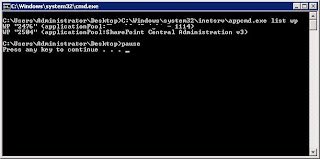

You can even throw this inside a batch file which gets called at the end of the a post-build event.

Note that this is only applicable for servers running IIS7. Previous IIS versions had a different tool called iisapp.vbs which is no longer available with IIS7.

Sorting Profile in Commerce Server 2007 and Mojave

At the time of this writing sorting is not supported by Mojave on the Profile entity. As a matter of fact, if you write and execute a Mojave query, the sortProperties attribute will only have any effect if you are dealing with one of the following entities:

  • Catalog
  • CatalogEntity
  • Category
  • Product
  • Variant
The CommerceSortProperty will simply be ignored for any other entities including Profile.

So how exactly do you sort one of these entities? Well, not surprisingly, you will have to do it yourself. For example, if you run a query to get the credit cards from the user profile, the returned list will be random at best. Typically, you will store this result inside a Collection object of some sort. The DefaultSite that ships with CTP4, uses a generic Collection object called Collection. Before you return this unsorted list to your caller, you can send this object to the following method which will sort it for you.

private static ICollection SortCreditCardsCollectionByDateCreated(Collection creditCardsCollection)
{
List listCreditCards = new List(creditCardsCollection);
listCreditCards.Sort(
delegate(CreditCard x, CreditCard y)
{ return DateTime.Compare(x.DateCreated, y.DateCreated); }
);
return (new Collection(listCreditCards));
}

The above method sorts the list on the DateCreated attribute. You can take it one step further and generalize this method to actually pass in the attribute on which you wish to sort, and place it in a MojaveUtilities class if you wish.

And now, you can sort profile or any other entity you wish to sort in Commerce Server 2007 using Mojave API.

Refreshing Cache from Mojave API

My last post was regarding how to refresh CS07 cache concerning the web services. It is important to note however that when you are dealing with Mojave code, such as working on the Default Site that ships with CTP4 (or upcoming CTP5), that the code does not use these web services. These web services are used by integration applications (e.g. Biztalk) or the management application MMCs (e.g. Customers and Orders Manager, Catalog Manager, etc.).

One example would be when you a user adds a credit card to his profile. A new credit card entry is created which includes all the information e.g. credit card number, expiry date, etc. However, it does not include the DateCreated i.e. the time stamp at which the user created the credit card entry on the site. This attribute is filled in on the Commerce Server/Sql Server side. Therefore your local cached copy of the newly created credit card will not have DateCreated attribute in the cache. Why is this a problem? Well, if you want to sort the credit cards by DateCreated attribute, this is a problem. You will not be able to do a meaningful sort until and unless the CS07 cache refreshes. An iisreset, for example, will clear the cache for you. Note that resetting the cache from the management applications or changing the settings in the Commerce Server web services' web.config will have no effect. Remember, you are making Mojave calls which are going straight to CS07 (Microsoft.CommerceServer.* libraries). The web services are simply not in the play here.

So, how do you refresh Commerce Server 2007 cache from Mojave API? There are two ways:

1. Directly Using CommerceUpdate

CommerceUpdate updateCache = new CommerceUpdate();
updateCache.SearchCriteria.Model.Name = "ProfileCache";

CommerceResponse response = OperationService.ProcessRequest(GetCurrentRequestContext(), updateCache.ToRequest());

2. When a CommerceQuery is done. If the search criteria contains the last modified date, it will be evaluated against the retrieved user profile and if different, the CS2007 cache will be refreshed.

CommerceQuery query = new CommerceQuery();
query.SearchCriteria.Model.DateModified = DateTime.UtcNow;
query.SearchCriteria.Model.Email = email;